Docs-as-code is usually pitched for software documentation: API references, man pages, READMEs that live next to the code they describe. This post points it somewhere less obvious: a print poster and a typeset book, ink on paper, the kind of work that normally belongs to a page-layout application. The argument is that the same property which makes docs-as-code good for API docs makes it good here too, and that the gap is widest exactly where print work is hardest.
- Software documentation
- Docs-as-code
- Same architectural property
- Print artifacts
The same problem, two artifacts
Consider two print documents built in InDesign.
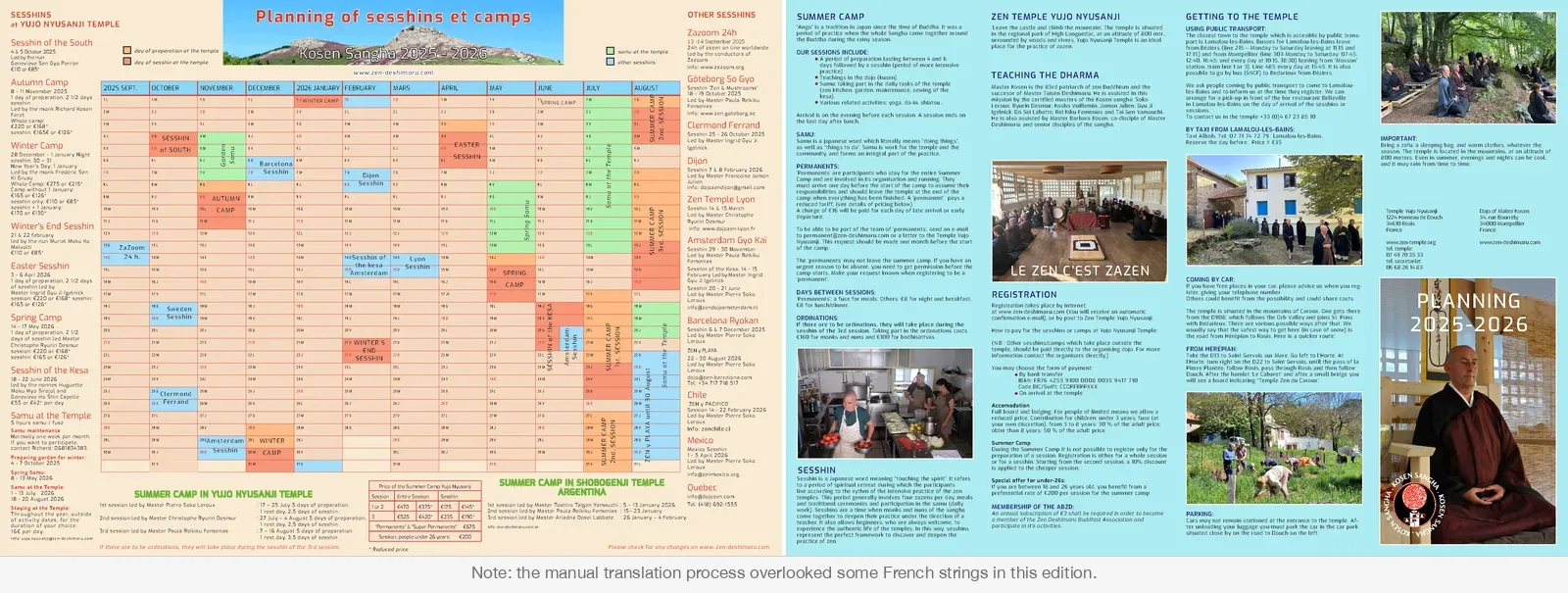
Annual planning poster
A3 / 2 pages370 calendar cells that shift annually, event color spans, hand-placed week labels, repeated lead names, duplicate prices, and an IBAN in multiple unlinked text frames.
Multi-volume book
A5 / 3 volumesMultiple contributors pushing under a hard press deadline, 136-page reflow risk from midnight spacing adjustments, manual eye-checks, and coordinated cover, spine, and front spreads.
The first is an annual two-page A3 planning poster for a community group. Page 1 holds a 12-month calendar grid, roughly 370 cells, each labeled with a day of the week. That alignment shifts every year: September 2025 opens on a Monday, September 2026 on a Tuesday. Each common year nudges the alignment forward by one day, each leap year by two, so no year’s grid can be carried forward from the last. Every cell must be rechecked. For each of the dozen events on the calendar, the correct cells must be filled with the right color (preparation days, immersion days, maintenance days each in their own shade) and a label positioned by hand over the right week.
The event descriptions compound the problem. Each immersion lists exact dates, the lead’s full name and title, two prices. The same lead’s name appears in the event block, in the calendar label, and on page 2 in the certified-leads list. The IBAN for bank transfers lives in an invisible text box in the registration section, and in another invisible text box in the transport section. A name change or a correction has to be tracked down in all of these places by hand. The document looks finished. The errors are real.
The second is a three-volume edition of a teacher’s recorded talks. The document is long, involves multiple contributors, and has a hard deadline: a press run. In InDesign, a late change to the layout carries real risk. Any reflow cascades. Every affected page must be re-checked by eye. A spacing adjustment made at midnight on a deadline can push text out of position across a chapter break and nobody notices until a printed copy comes back wrong, at which point the original file may no longer be findable, let alone re-editable. The cover (back, spine, and front) is also pure LaTeX.

These are not unusual InDesign problems. They are what InDesign files become when they accumulate facts with no single home.
What “no single home” means in practice
An InDesign file stores text in frames. Frames don’t know about each other. A lead’s name that appears in three frames is three independent copies of the same fact. Correct one and the others remain unchanged, unless the editor knows to look for them, which requires knowing the document well enough to know where the name appears.
This is the brittle-file failure mode: the document encodes facts without structure. Its internal consistency depends on the discipline and memory of whoever last edited it. Maintenance accumulates difficulty: each year, each revision, the editor must re-learn the document’s hidden geography.
InDesign: unlinked frames
- One fact copied into frame 1
- Copied into frame 2
- Copied into frame 3 (silent drift)
docs-as-code: single source
- One fact in YAML
- Generator reads on build
- Every appearance derived automatically

The failure mode is quiet. A price updated in the session block but missed in the pricing table. A lead listed correctly in the event description but still carrying last year’s title in the calendar label. An IBAN corrected in the registration section, intact in the transport section.
Why manual duplication is fragile: The errors survive review because they look plausible. A stale price, an old title, or an outdated IBAN in an unlinked frame raises no red flags to a reviewer. They surface only in print.
But doesn’t InDesign already solve this?
It’s worth being fair, because InDesign isn’t the blunt instrument this kind of argument usually pretends. It has real mechanisms for consistency. Paragraph and character styles propagate a formatting change to every paragraph that uses them. Object styles do the same for frames. Text variables let a fact (a running header, a date, a name) be defined once and inserted wherever it is needed, so editing the definition updates every insertion. Data merge fills repeated layouts from a spreadsheet. GREP find-and-change rewrites patterns across the whole document. A careful InDesign user leans on all of these, and a drop cap governed by a paragraph style does change across every chapter opener when you edit the style, not one frame at a time.
So the honest question isn’t whether InDesign has global tools. It does. The question is where they stop. And they stop in four places that matter here.
1. The document boundary
ScopeWhat InDesign does: Text variables and styles operate inside one .indd file.
Where it stops: Cannot cross documents. The poster ships in French, English, and Spanish; the book in A5, single-volume, and web. Each edition is a separate file holding duplicate facts.
Why it matters: Fixing an IBAN or price in one edition leaves other editions stale.
2. No version history
ProvenanceWhat InDesign does: Saves the current binary state of the document.
Where it stops: No commit history, no semantic diffs, no audit log showing what shifted between seasons.
Why it matters: When something prints incorrectly, you cannot inspect the file history to discover what changed or why.
3. Cannot derive computed facts
ComputationWhat InDesign does: Formats frames and characters with styles and variables.
Where it stops: Cannot compute calendar math. A 370-cell grid shifting days each year is computed logic, not a style attribute.
Why it matters: No style knows whether the third Saturday of October falls inside an immersion span; cells must be colored by hand.
4. Consistency is optional
EnforcementWhat InDesign does: Provides powerful styles and variables if applied consistently.
Where it stops: Allows inline manual overrides, unstyled text boxes, and ad-hoc nudges anywhere.
Why it matters: Consistency depends on memory and discipline. Over years and contributors, overrides accumulate and consistency decays.
What docs-as-code does instead
The alternative is to give every fact exactly one home and derive all appearances from it. And to make that derivation the only way the document can be built, not a habit the editor has to keep.
The core principle: One fact, one home. Derive every occurrence from it on build.
- One fact
- Structured source (YAML)
- Generator / template
- All appearances
- All editions & formats
In the planning poster pipeline, the IBAN lives once in events.yaml:
inscriptions:
  iban: "FR76 4255 9100 0008 0035 9417 710"
The generator reads it and emits a named macro:
\def\inscriptioniban{FR76 4255 9100 0008 0035 9417 710}The shared template calls \inscriptioniban wherever the IBAN appears: registration section, payment instructions, bank transfer block. Change the value in YAML, rebuild, and every occurrence in every language edition is correct. There is nothing else to update. There is nowhere else the old value can survive. The cross-edition propagation that InDesign’s variables cannot do is the default, because the editions are built from the same source, not maintained as separate files.
- events.yaml: single IBAN
- Generator emits \inscriptioniban
- Registration + payment + transport update globally
The lead’s name lives once in leads.yaml. The generator reads it and populates the event block, the calendar label, and the certified-leads list from the same source. Correct the name in YAML, rebuild, all three places update simultaneously.
- leads.yaml: correct name once
- Run generator
- Event block, calendar label, and certified-leads list update simultaneously
The 370-cell grid is the case InDesign genuinely cannot match, because it is computed rather than styled. Each event in events.yaml carries a start date, an end date, and a type:
- name: "Autumn Session"
  start: 2026-10-15
  end: 2026-10-18
  type: immersion
  lead: rmd
The generator walks every day of the year, places each date into its weekday column and week row, and for any date falling inside an event span fills the cell with the type’s color and positions the event label over the first week of the span. Change a start date by a day and the colored span, the label position, and the surrounding empty cells all recompute on the next build. The weekday alignment that shifts every year is computed from the dates themselves, so the grid that took a manual recheck of 370 cells is simply redrawn. Nothing is placed by hand.
Generation, not styling: A grid of 370 dated cells is computed data. Date math places days into weekday rows, matches event spans, applies colors, and centers labels. Shift a date in YAML and the entire annual grid recomputes on build.
- Event dates in YAML
- Walk 365+ days & assign weekday rows
- Match event spans & apply type colors
- Position labels over first week
- Recompute entire grid on build

Late changes that stayed cheap
The books pipeline shows the same property under deadline pressure. Thirteen days, 167 commits. Some of those commits happened in the final hours before the first copy was handed to a reader.
Stray \\vspace after poems
136 pagesProblem: Blank line after every inline poem across all three volumes.
Fix: Single macro edit in source.
Result: Rebuilt in seconds; every occurrence fixed without styled-vs-unstyled drift.
Hanging drop caps (lhang=1)
Optical marginProblem: Drop caps pushing body text inward across every chapter opener.
Fix: Added lhang=1 to the \lettrine command.
Result: Global margin hang; InDesign would require opener-by-opener nudging.
Inverted index indentation
HierarchyProblem: Sub-entries indented deeper than continuation lines.
Fix: Redefined three internal commands in a \makeatletter block.
Result: Correct hierarchy restored across the entire three-volume index on the next build.
11-year-old typo ('poumonsn')
Cross-formatProblem: Stale typo sitting in a source file from eleven years earlier.
Fix: One edit, one commit, one rebuild.
Result: Corrected in A5, single-volume, Spanish edition, and web simultaneously.
A stray \vspace{\baselineskip} had been generating a blank line after every inline poem throughout all three volumes. One macro change, one rebuild: every occurrence fixed simultaneously, across 136 pages. An InDesign user who had styled every poem identically could fix this once too, by editing the style. But that is precisely the condition that fails in practice: across three volumes and several contributors, some poems get the style and some get typed-in spacing, and the single edit only reaches the ones that were styled. In the LaTeX source there is no styled-versus-unstyled distinction to drift apart. Every poem is the same macro, so one change reaches all of them by construction.
Adding lhang=1 to the \lettrine command let every drop cap hang into the margin instead of pushing body text inward (a global change across every chapter opener in all three volumes). This one InDesign cannot reduce to a style toggle: hanging a drop cap into the margin is fiddly optical-margin work, adjusted opener by opener.
Sub-entries in the index were more deeply indented than continuation lines, inverting the visual hierarchy across the entire index. A \makeatletter block redefining three internal commands fixed it on the next build, for every entry at once.
A typo, “poumonsn” for “poumons”, sat in a source file from eleven years earlier. One edit, one commit, one rebuild. The correct word appeared in every format: A5, single-volume, Spanish edition, web. Automatically. This is the cross-boundary case again: in a copy-based workflow the only question is which copy has the fix and which still carries the error.
Build traceability and platform info
A printed document out in the world usually loses its connection to source control. In an InDesign workflow, once a PDF is sent to the press, you cannot inspect the physical copy to tell which draft or export produced it.
Here, every build stamps its provenance onto the page. An explicit architectural decision governs this: Git commit hashes are deliberately omitted from exterior covers to keep trade dress and typography pristine, but strictly enforced in the interior colophon and planning footers. You can always check from which revision a printed document was built by checking the short Git commit hash (such as 8772faa) in the colophon.
- Git commit hash (e.g. 8772faa)
- TeX Live 2025 engine
- Compiler platform (macOS arm64 / Linux AMD64)
- Stamped in interior colophon

Printed books go one step further by recording the build platform and TeX engine: Compilation PDF: TeX Live 2025, macOS arm64. Because typographic line wrapping, hyphenation, and micro-spacing can vary slightly across platforms compared to the reference Linux AMD64 build, knowing the compiler environment alongside the Git revision ensures that any printed page can be audited and reproduced.
Exterior cover wraps receive their own automated preflight: dynamic spine width calculations based on page count and paper bulk (e.g., 11.2 mm for Volume II, 18 mm for the single-volume edition), 4–5 mm bleed margins, and FOGRA39 / ISO Coated v2 ICC profile conversion. For visual inspection, dedicated overlay targets (make couverture-*-reperes via the LaTeX crop package) render physical crop, spine fold, and safety lines directly on the cover spread.
The structural reason
The InDesign model couples content to format. Facts live in frames; frames live in a layout; the layout is the document. Changing a fact requires navigating the layout. Changing a layout requires touching the facts it contains. The two concerns are entangled from the first edit, and the global tools that fight the entanglement (styles, variables, merge) are aids the editor has to remember to use.
The docs-as-code model separates them. Facts live in structured files: YAML, plain text, LaTeX source. The layout is a template that consumes facts through named interfaces. Changing a fact means changing the structured file; the template is untouched. Changing the layout means changing the template; the facts are untouched.
The architectural distinction: InDesign’s consistency is optional and overrideable; docs-as-code’s consistency is structural. In InDesign, consistency depends on the editor remembering not to override styles. In docs-as-code, there are no frames to override: every appearance is derived from the single source on build.
The tighter the deadline, the more that property is worth. When there’s no time to re-check 136 pages by eye, or to hunt for an IBAN across an invisible text-box geography you half-remember from last year, a system where “fix it once” actually means “fix it everywhere” is not a nice-to-have. It’s the difference between a correction that lands and a correction that misses.
What this costs
The docs-as-code approach requires upfront investment: a structured data model, a build system, a LaTeX or other template engine, and the discipline to maintain the separation. For a one-time document produced by one person with no plans to revise it, that investment is not worth making.
The deeper cost is not the LaTeX: it is the dependency on someone who can maintain the pipeline. InDesign skills are common; if an editor leaves, a replacement is findable. A bespoke YAML-to-LaTeX generator is not, and when its author leaves, the group can be left with a build it cannot modify. This is a real fragility, and it is fair to weigh it against the fragility it replaces.
The dependency trade-off
Trade-offReplaces one fragility with another: Eliminates silent text-frame drift, broken cross-references, and manual calendar rechecking, but introduces a dependency on someone who understands the generator and template engine.
When the investment pays off
Payoff criteriaScales with repetition and risk: Worth the investment when documents recur annually, involve multiple contributors, operate under hard press deadlines, or propagate across multiple editions and formats.
Two things soften it without erasing it. First, the facts live in YAML, which a non-programmer can safely edit: changing a date or a price does not require understanding the template, so routine content updates survive the author’s departure even when template changes do not. Second, the whole pipeline is in version control (documented, reproducible, and diffable), which a printout or an orphaned .indd file never is. But if no one can touch the template, you have traded one dependency for another. The approach pays off when there is a plausible successor for the pipeline, not only for its data.
With that caveat, the payoff scales with use. A document that recurs annually (a planning poster), involves multiple contributors under deadline (a multi-volume book), or accumulates corrections over time (any living document) repays the investment in proportion to how often it is updated and how many facts it contains.
The planning poster changes every year. It has a dozen events, each with dates, prices, and lead references that appear in multiple places. The InDesign alternative required rechecking all of it by hand, every year, with no structural guarantee that a correction in one place propagated to the others; the tools that could have helped only worked as far as someone kept using them.
The docs-as-code alternative requires editing one YAML file and rebuilding. The guarantee is structural, not procedural. It doesn’t depend on the editor’s discipline or memory. It’s a property of the architecture.
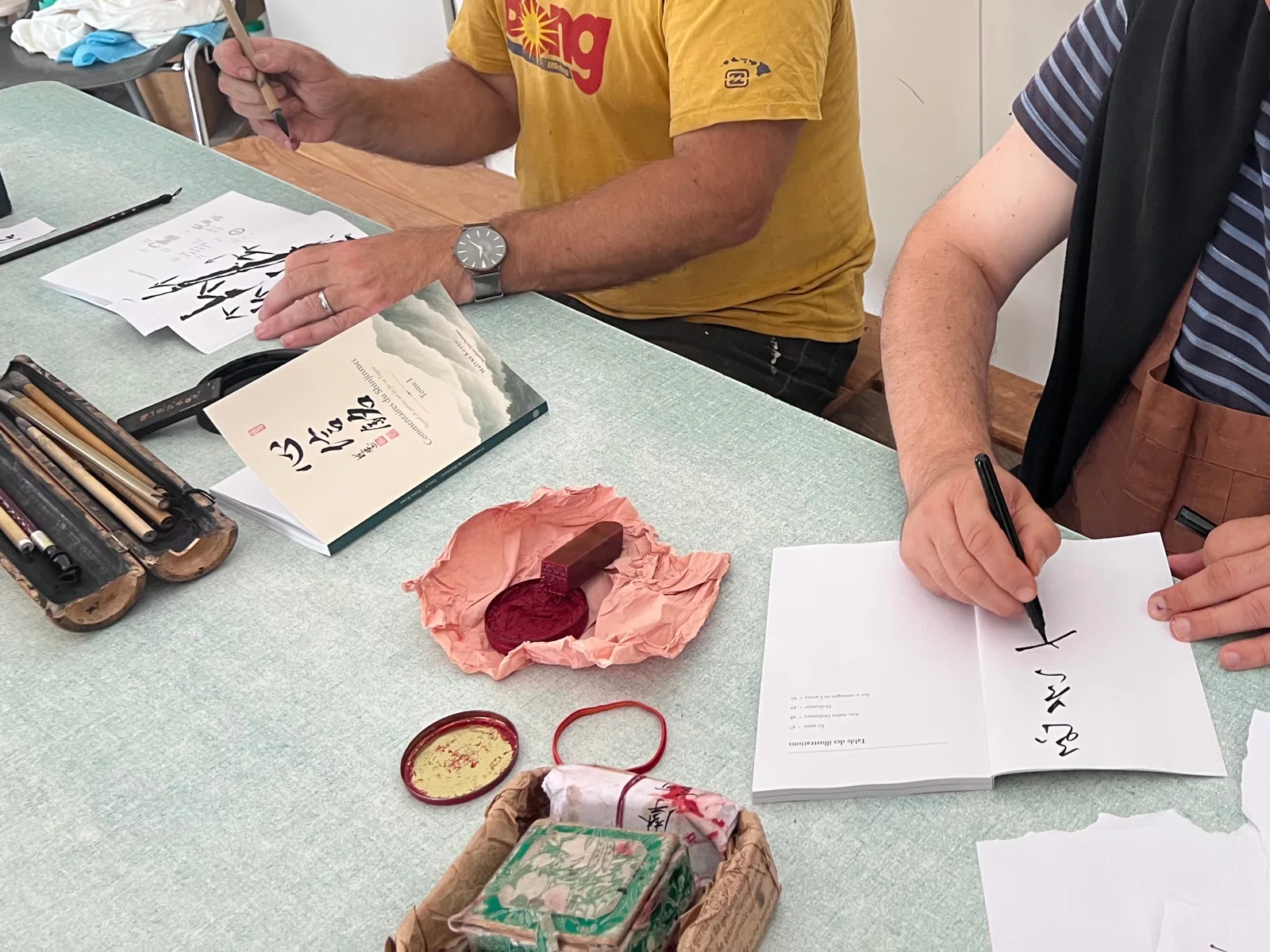
The pipeline generates the pages, but the finished copy still gets signed and sealed by talented calligraphers and sumi-e artists: brush, wax, red ink. Not every step in a book’s life is a build step.
200 copies were printed. The book was priced at €20, and 50 copies were sold within the first two weeks, covering the entire cost of printing.
Summing up
Related reading
- Source format — how the source format shapes everything downstream.
- Integrating documentation into development — docs-as-code as part of the pipeline.
- Version management systems — rustic but reliable — version control versus hand-maintained binary layout files.