# One YAML file, three outputs: API docs, web, and mobile
**Core premise:** A single structured YAML file in Git powers a live REST endpoint, interactive Swagger documentation, static SEO-optimized HTML components, and mobile app payloads—eliminating manual content synchronization across channels.
This article demonstrates how to build a **self-documenting API in Astro** using a single source of truth. You can inspect the live implementation right now in the [**interactive API documentation**](https://redaction-technique.org/docs).
To understand why this architecture matters, consider three immediate questions:
* **What is being demonstrated?** An Astro site hosting both its human-facing documentation and its machine-readable REST endpoints from the same codebase.
* **What is the source of truth?** A plain-text YAML file (`oil-types.yaml`) stored directly in Git.
* **What are the three outputs?** Interactive Swagger/OpenAPI documentation, prerendered static HTML tables, and live JSON payloads consumed by web or mobile applications.
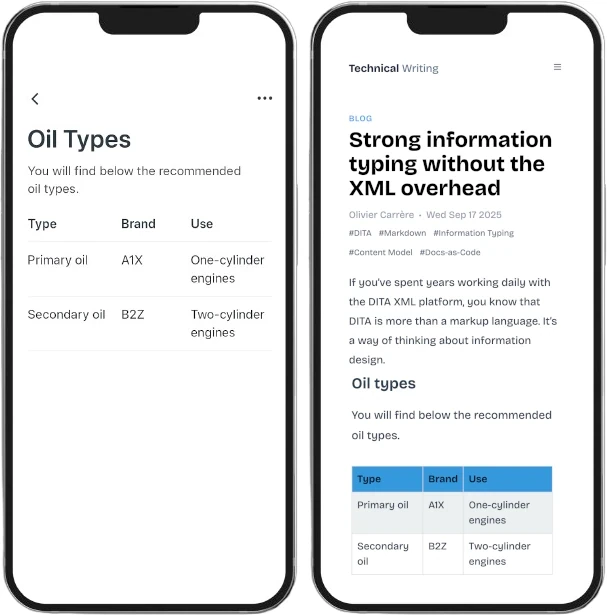
One source, multiple form factors: mobile application cards and desktop web pages rendered from the same reference data.
## Querying the API in practice
The live endpoint can be queried directly from client-side JavaScript or from your terminal.
### Client-side integration: JavaScript fetch
For web components, mobile web views, or single-page applications, query the endpoint using modern `fetch`:
### JavaScript fetch example
```ts
// Fetch all oil types from the live Astro endpoint
fetch("https://redaction-technique.org/api/oil-types")
.then((res) => res.json())
.then((data) => {
console.log("Oil catalog data:", data);
});
```
### Terminal testing: cURL
For command-line testing, shell automation, or continuous integration checks, inspect the endpoint with `curl`:
### Terminal cURL example
```bash
# Query the live endpoint from terminal
curl https://redaction-technique.org/api/oil-types
```
---
## Inspecting the structured JSON response
Calling `GET /api/oil-types` returns the full structured catalog serialized directly from the source YAML:
Endpoint: GET /api/oil-types | Status: 200 OK | Content-Type: application/json
```json
{
"id": "oil-types",
"title": "Oil types",
"shortdesc": "You will find below the recommended oil types.",
"properties": {
"headers": {
"type": "Type",
"value": "Brand",
"description": "Use"
},
"rows": [
{
"type": "Primary oil",
"value": "A1X",
"description": "One-cylinder engines"
},
{
"type": "Secondary oil",
"value": "B2Z",
"description": "Two-cylinder engines"
}
]
}
}
```
*Notice:* The JSON response retains the top-level document metadata (`id`, `title`, `shortdesc`) alongside the structured tabular rows (`headers`, `rows`). The API does not flatten or obscure the data model—it exposes the exact semantic structure defined in `oil-types.yaml`.
---
## Why YAML as the source of truth?
Instead of maintaining a static JSON schema and manually duplicating it into documentation topics, the entire specification generates **directly from YAML**.
This architecture delivers three decisive operational advantages:
1. **Zero drift across channels:** The API endpoint, the interactive Swagger UI, and the documentation pages cannot diverge because there is only one file to edit.
2. **Automated multi-channel propagation:** When an engineer or technical writer updates a product name, price, or viscosity grade in `oil-types.yaml`, every downstream consumer refreshes during the next build.
3. **Auditability and docs-as-code:** Storing reference data in [plain files rather than a database](https://redaction-technique.org/manage-content-in-files-not-databases) keeps your content version-controlled, easily diffable, and reviewable using pull requests.
**Build-time vs. runtime synergy:** The exact same YAML file serves dual duty in Astro. At build time, Astro components import `oil-types.yaml` to prerender fast, SEO-friendly HTML tables. At runtime, the API route exposes it as dynamic JSON for external consumers—all without writing synchronization scripts.
---
As explained in [Strong Information Typing Without XML Overhead](https://redaction-technique.org/strong-information-typing-without-xml-overhead), modern docs-as-code workflows let technical writers structure information using lightweight, open tools without the operational complexity of legacy XML pipelines.
## Related reading
- [What YAML gives technical docs that XML and Markdown can't](https://redaction-technique.org/scalable-maintainable-technical-docs-with-yaml) - deep dive into Git diffs, table maintenance, and schema validation.
- [Structured and unstructured formats](https://docs.redaction-technique.org/en/formats/structured-vs-unstructured-formats/) - using a single structured source to feed multiple outputs.
## External sources
- [OpenAPI specification](https://www.openapis.org/)
- [Astro: build-time rendering from YAML](https://astro.build/)
- [Swagger interactive API documentation](https://swagger.io/)
*Hero image: ["Mitchell River delta"](https://www.flickr.com/photos/feralarts/5508196784) by [Feral Arts](https://www.flickr.com/photos/feralarts/), licensed under [CC BY 2.0](https://creativecommons.org/licenses/by/2.0/).*
---
Source: https://redaction-technique.org/experimental-astro-api-docs